coreCerebrum

Your team's AI, finally working as a team.

coreCerebrum gives everyone one shared brain, gives every task its own running agent, and shows what each piece of work cost. People stop re-solving yesterday's problems and start shipping today's.

30-day free trial. Card on file, first charge in month 2. Cancel anytime before then.

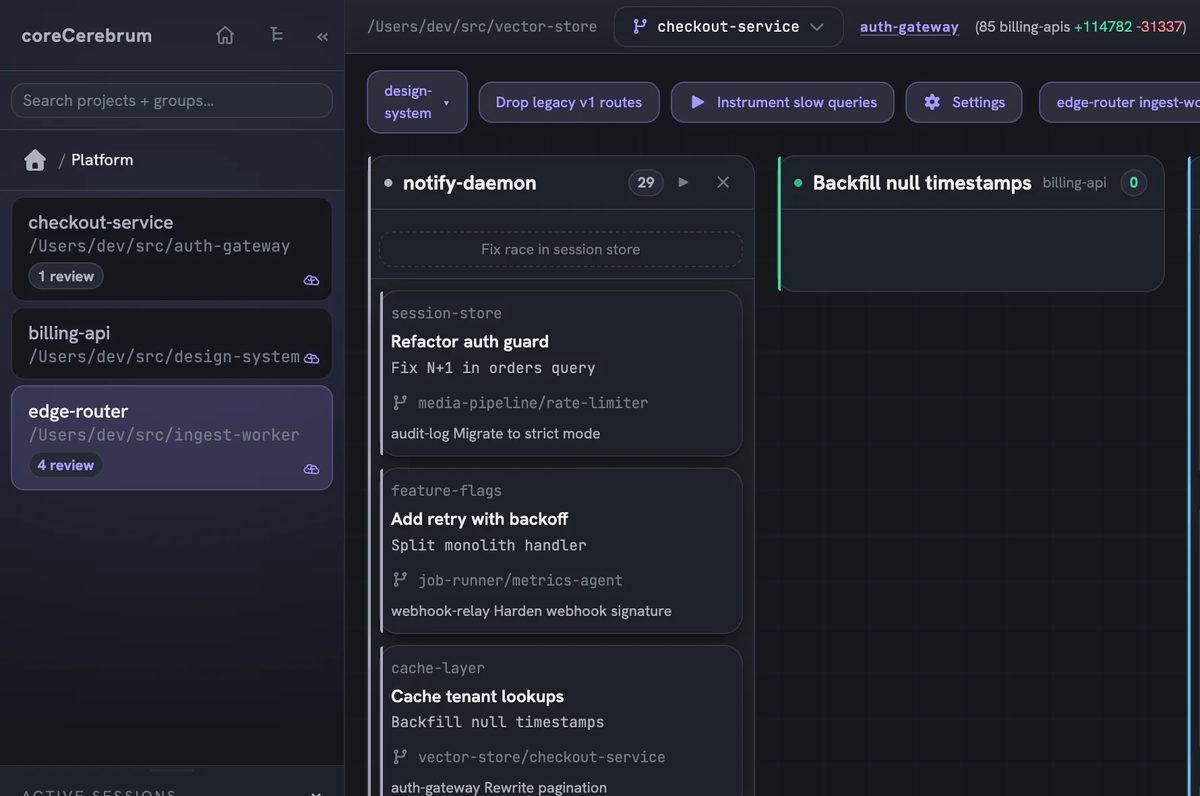
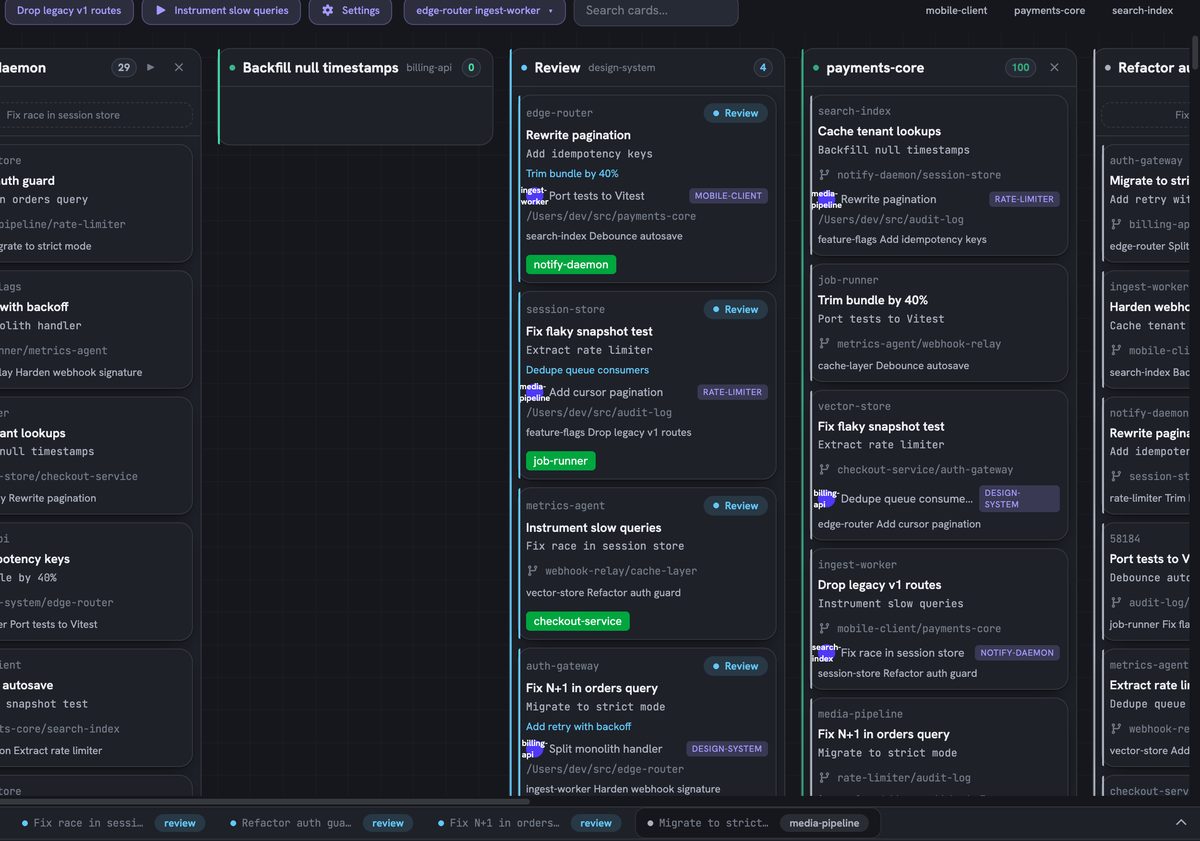
The coreCerebrum board: projects on the left, lanes of agent cards with branches and review states, captured from a running install
A real screen from a running install. Project and card names are pseudonymized.

You are paying for the same answer more than once

Most teams run AI the way they started: one chat window per person, one agent per repo, and a bill that only shows up at the end of the month. That is where the money leaks out.

Stop the leaks
  • Solved once, paid for again

    Someone works out a hard problem. Next week a teammate asks the same thing and pays for it from scratch.

    Billed twice
  • Forgotten by tomorrow

    Conventions, gotchas and decisions vanish when the window closes. Every session rediscovers them.

    Gone overnight
  • Sessions that quietly balloon

    Every turn re-sends the whole context, so a long session costs more with every reply and nobody sees it happen.

    Invisible spend
  • One agent, one window, you wait

    The agent is the bottleneck. You sit idle while it thinks instead of starting the next task.

    Idle hours

Everything your team does with AI, on one board

Six pieces that work together. Pick one to see the real screen behind it.

Team brain

Decisions, conventions and gotchas are captured while people work, cleaned up on their own, and recalled on the prompt that needs them. One person solves it, everyone keeps it.

  • Captures as you go: say "we decided" and it is saved
  • Hybrid search by meaning and keyword
  • A nightly job archives the obsolete and fades the stale
See how the brain works
Example recall. File names are illustrative.

Many agents on one codebase. Each on its own branch.

Write a card, get a branch. coreCerebrum cuts a fresh git worktree for every card and starts a real Claude Code session inside it, with the harness loaded and the team memory already recalled.

  1. Backlog2

    You write the card

    • billing-apiAdd idempotency keyscerebrum/20a11
    • design-systemRewrite paginationcerebrum/18a13
  2. In progress2

    An agent works in its own worktree

    • edge-routerDrop legacy v1 routescerebrum/28a11
    • auth-gatewayRefactor auth guardcerebrum/26a12
  3. Review1

    You check a normal branch diff

    • payments-coreCache tenant lookupscerebrum/34a13
  4. Done1

    Merged and cleaned up

    • ingest-workerFix flaky snapshot testcerebrum/44a13

Ten cards running means ten reviewable diffs

Each worktree is a real directory on a real branch that shares the repository's object database, so it is cheap to create and nothing lands on main by accident. When an agent needs a decision, its card moves to Needs you and stops.

How orchestration works
One card, one worktree, one branch.

What one person solves, the whole team keeps.

Team memory is the part most agent tools leave out. Say "we decided", "the convention is" or "gotcha" while you work and it is saved. A newer decision supersedes the old one, history is never hard-deleted, and the right memories are recalled at the start of every session.

  • New hires work inside your conventions from day one
  • Linked notes build a knowledge graph with backlinks
  • Current library docs served into the session on request
Inside the team brain
Example recall. File names are illustrative.

See the cost while it is still cheap to change

Running agents all day turns token spend into a real line item. coreCerebrum watches it for you and speaks up before the invoice does.

  • A warning before a session gets expensive, with the reason and a one-click compact.
  • Re-read detection. A session that already read a file is told so, with a token estimate, before it reads it again.
  • Spend by project, person and card, read from the transcript your AI tool actually wrote.
  • Your own AI accounts. Never resold, never marked up.
All spend controls
The wording of the real warning in the app. Session name and size are an example.
The tiles and ranges in the Admin view. Bars are illustrative.

The rest of the team gets a coworker too

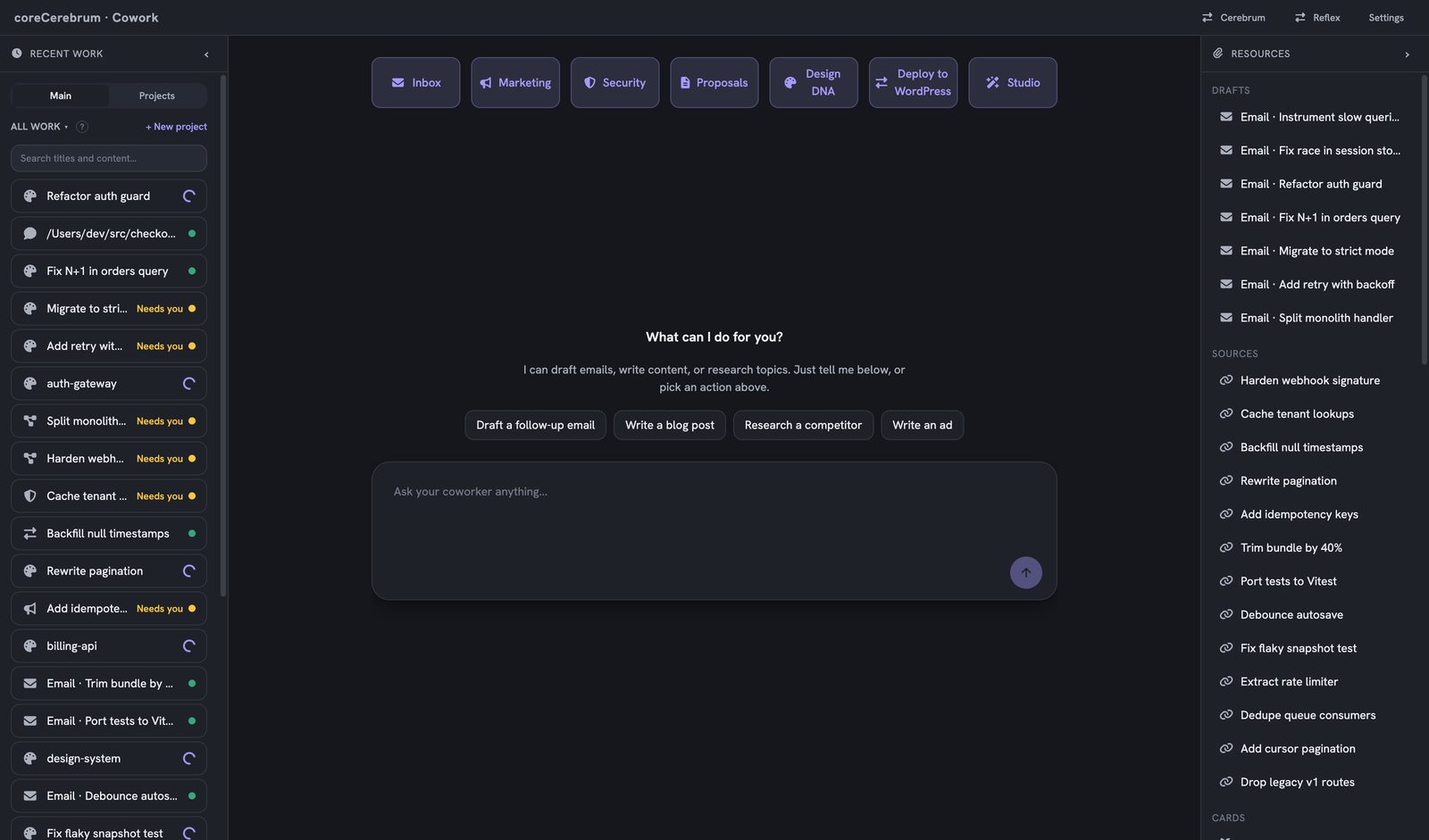
Not all of the work is code. Cowork is a no-terminal surface for sales, marketing, ops and owners, running on the same board and the same memory as your developers.

The Cowork surface: recent work on the left, workflow chips across the top, a chat box asking what it can do, and drafts and sources on the right
  • Draft email

    Researches the recipient, drafts the reply and saves it to your Gmail drafts.

  • Marketing and content

    Blog posts, SEO meta, ad copy and social, with live word and keyword counts.

  • Research

    A topic, competitor or question turned into a brief with clickable sources.

  • Proposals and dev requests

    Business asks land in a Requests queue for a PM to triage onto a board.

Example threads. The inferred task is shown for you to edit before anything is created.

Your inbox turns into finished work

Gmail lives inside coreCerebrum. Archive and label it, reply from it, or convert a thread into a card. The thread is read once and turned into a concrete instruction you can see and correct before the card exists.

Email management

The product is the evidence

We have no customer logos or testimonials to show you yet, so there are none here. Here is what you can check for yourself.

  • Real interface

    The screens on this page were captured from a running install. Only project and card names are changed.

  • Measured from transcripts

    Usage is read from the per-turn transcript your AI tool writes, then attributed to the session that spent it.

  • Hard limits

    Destructive operations are refused by a hook before they run. The model is never trusted to remember.

  • Built on our own work first

    The 'corePHP' team runs its agency on coreCerebrum, and corecerebrum.guru itself was built by a card on the board.

coreCerebrum vs. winging it with chat windows

The same AI you already pay for, with a team layer around it.

Working with AI ad hoc compared with coreCerebrum
The jobAd hoc chat windowsWith coreCerebrum
Where solved work goesStuck in one person's chat historyTeam memory, recalled on the prompt that needs it
Running work in parallelOne window at a time while you waitMany cards at once, each on its own branch
Keeping agents safeA prompt asking the model to be carefulHooks that refuse destructive operations before they run
Knowing what it costThe invoice at the end of the monthWarnings mid-session and spend by project and person
Reviewing the workWhatever got pasted back into the chatA review gate and a normal branch diff
Email that needs actionA separate tab and a copy-pasteThreads become cards with the task inferred
The rest of the teamSeparate tools and separate loginsCowork on the same brain: email, marketing, research, Design DNA
Library documentationWhatever the model remembers from trainingA docs service that crawls the current docs

Why teams switch

Pick the seat that matches the work

Every plan works with the AI you already use. You keep paying your AI provider directly; coreCerebrum makes that spend go further.

Memory

$30per user/month

Billed monthly. Billed only for active seats.

$25 per user/month at 100+ seats

For anyone who uses AI to write, research or answer questions.

  • Team memory shared across your whole team
  • Every request trimmed, so you hit limits less
  • Claude, ChatGPT and Gemini on your own keys or plan
  • Live savings meter
  • Desktop and web app with inbox and Gmail
Start your 30-day free trial

Most popular with teams

Build

$100per user/month

Billed monthly. Billed only for active seats.

For developers and technical builders.

  • Everything in Memory
  • Run several AI agents side by side
  • Each agent in its own safe workspace
  • Session controls
  • The full developer toolkit: skills, commands, review agents, hooks
  • Cost by project and developer
Start your 30-day free trial

Studio

$200per user/month

Billed monthly. Billed only for active seats.

For people who build software and websites.

  • Everything in Build
  • Design DNA for websites, landing pages and presentations
  • Export everything you make
  • One-click publish available
Start your 30-day free trial

Enterprise: your brain, built in your environment.

A custom coreCerebrum built inside your own infrastructure: on-prem, private cloud, AWS GovCloud or Azure Gov. Custom seat pricing, SSO, security review and a named contact.

All self-serve plans include the 30-day free trial. Card on file, first charge in month 2. You are billed only for active seats (a seat that did not use coreCerebrum that month costs nothing). Save 20% with annual billing. Full pricing and seat calculator

What do buyers ask first?

Anything else? Email [email protected] and a person from the team replies.

All questions
Do I still pay for ChatGPT, Claude or Gemini?

Yes. You keep your own plan or keys and keep paying your AI provider directly. coreCerebrum never resells or marks up your AI usage. Its job is to make that spend go further.

What is team memory, and how is it different from the memory in my chat app?

Your chat app remembers one person's preferences. Team memory keeps your whole team's solved work: decisions, conventions and gotchas are captured as you work, de-duplicated, and recalled on the prompt that needs them, so when one person figures something out, everyone can reuse the answer.

What is the difference between Memory, Build and Studio?

Memory ($30 a user) is team memory and lighter requests for anyone who uses AI to write, research or answer questions. Build ($100) adds agents that run side by side, each in its own safe workspace, plus the developer toolkit. Studio ($200) adds Design DNA for websites, landing pages and presentations, with export and one-click publish.

Does my code leave my machine?

The board runs locally against your own checkouts, and every agent works in a git worktree that is a normal directory on your disk. The local server only listens on your own machine. When the optional team backend records usage, it sends totals such as token counts and cost, never transcript content.

How does coreCerebrum help me spend less on AI?

Several ways at once. Solved work is recalled from team memory so it is not paid for again. A session that has already read a file is told so before reading it again. A session whose context has grown large raises a warning with the option to compact it. And spend is shown by project and person, so you can see where it goes.

When will my card be charged?

Nothing for 30 days. Your first charge is on day 31, for your active seats. Cancel before then and you will not be charged.

Give your team one brain this month

Start with a Memory seat at $30 a person, add Build for the people who run agents, and see the difference on your own work. No charge for 30 days.

No charge for 30 days. Your card is billed starting month 2.